Clique para ver a imagem completa · Referência do caso original
Fonte do caso
@wolfaidev ↗ · Caso #91
Conteúdo original do caso preservado. Os resultados gerados dependem da versão do modelo, imagens de referência e parâmetros; este site não retestou cada item e não garante a reprodução do mesmo resultado.
UI e Interfaces / PROMPT #91
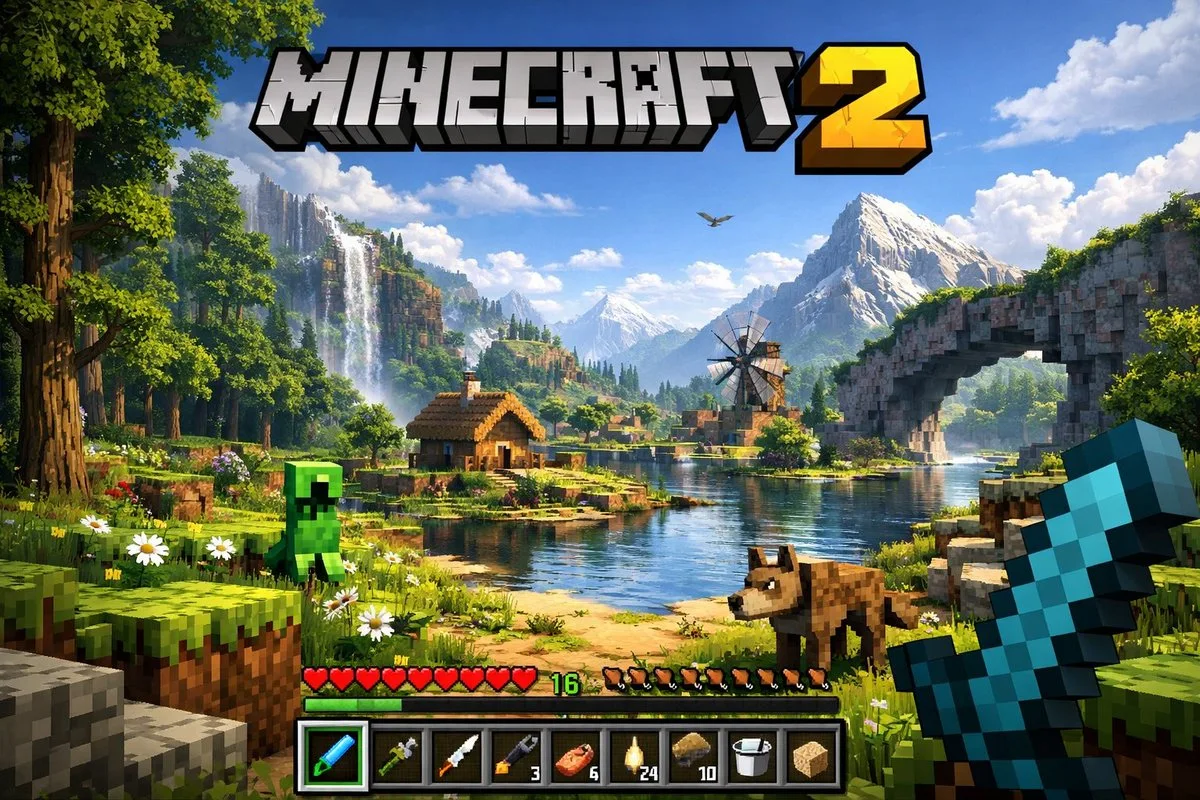
Captura de tela de interface de jogo
Veja a imagem primeiro e depois copie o prompt original. Se houver marcadores, substitua-os abaixo com o seu conteúdo.
01 / Configure sua versão
Nenhum marcador detectado neste caso. Após copiar, você pode alterar sujeito, cores, texto na imagem e proporção.
02 / Prompt completo · Original
A highly detailed, realistic first-person video game screenshot of a next-generation voxel-based world. At the top center, a large, bold 3D logo reads "{argument name="game title" default="MINECRAFT 2"}". The scene features a {argument name="environment" default="lush, blocky landscape with a river, a small wooden cabin, a windmill, a waterfall, and majestic mountains in the background"}. The world blends realistic lighting, volumetric clouds, and high-resolution textures with cubic, voxel geometry. In the foreground on the left, a {argument name="mob 1" default="blocky green creeper"} stands on the grass, while a {argument name="mob 2" default="blocky brown wolf"} stands on the dirt path to the right. On the far right, the player's hand holds a {argument name="held item" default="pixelated blue diamond sword"} in a first-person perspective. At the bottom of the screen is a game user interface featuring a health bar with 10 red hearts, a green experience bar with the number '16', a hunger bar with 10 brown meat icons, and a 9-slot inventory hotbar. The hotbar contains, from left to right: a selected blue tool with a green highlight box, a green tool, a knife, a wrench with the number '3', a piece of meat with '6', a lantern with '24', a dirt block with '10', a bucket, and a sponge block.Copie para a ferramenta de geração de imagens que você usa; este site oferece visualização e edição de prompts, não gera imagens diretamente.
03 / Verificações antes de gerar
- Substitua os marcadores por conteúdo específico e verifique se é necessário enviar uma imagem de referência.
- Para textos na imagem, defina a redação final com clareza e confira letra por letra após gerar.
- Ajuste apenas um elemento por vez (sujeito, iluminação ou composição) para facilitar a comparação dos resultados.
Continue explorando inspirações semelhantes
Mais casos de UI e Interfaces
UI e Interfaces
Comercial de Luxo com Efeito Saindo da Tela para Redes Sociais
Ver prompt completo ↗#404