클릭하여 전체 이미지 보기 · 원본 사례 참조용
사례 출처
@songguoxiansen ↗ · 사례 #164
원본 사례 내용을 유지합니다. 생성 결과는 모델 버전, 참조 이미지 및 매개변수에 따라 달라질 수 있으며, 본 사이트에서 개별 검증을 진행하지 않아 동일한 결과의 재현을 보장하지 않습니다.
UI 및 인터페이스 / PROMPT #164
시청자 천만 돌파 트럼프 우주 라이브
먼저 이미지를 확인한 뒤 원본 프롬프트를 복사하세요. 치환 문구가 있는 경우 아래에서 원하는 내용으로 변경할 수 있습니다.
01 / 나만의 버전 설정
02 / 전체 프롬프트 · 원문
[中文]
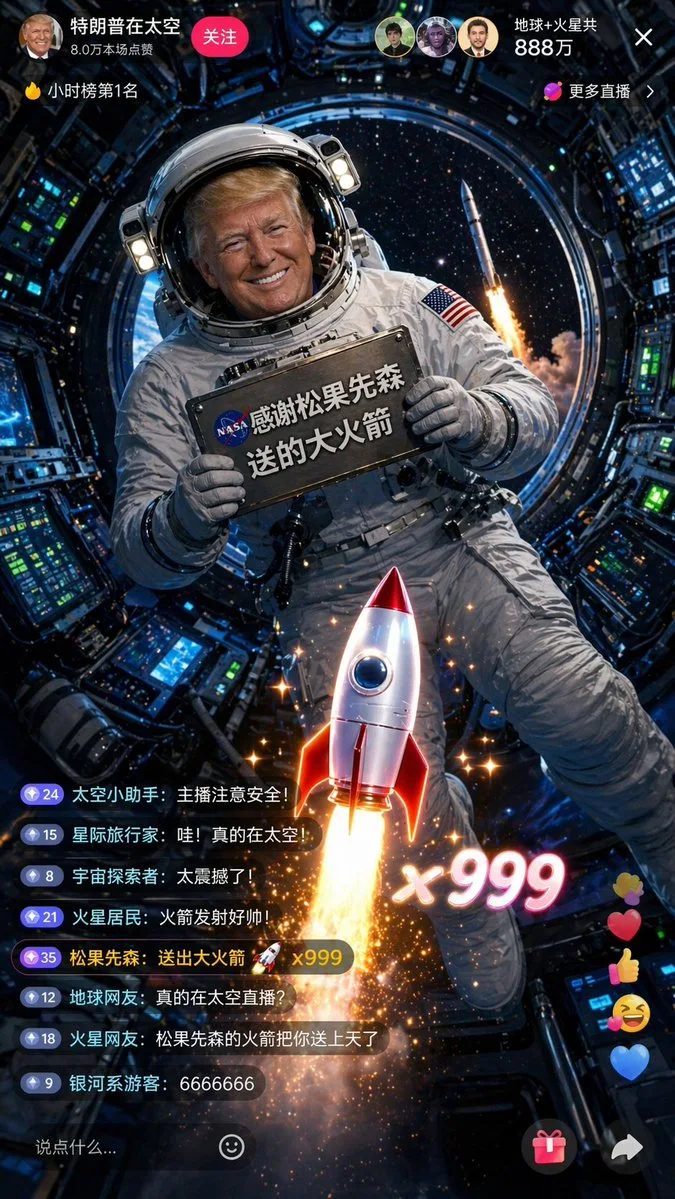
一张9:16竖屏的抖音直播截图,太空直播风格。特朗普穿着NASA风格的白色宇航服,头盔面罩半开,露出他标志性的金色头发和笑容。他漂浮在国际空间站的舱内进行直播,处于微重力失重状态,身体微微悬浮。他双手举着一块固定在宇航服上的金属铭牌,铭牌上用NASA风格的印刷体写着"感谢松果先森送的大火箭"。身后圆形舷窗外可以看到蓝色的地球和深邃的太空。直播界面显示在线人数"地球+火星共888万"。弹幕区有人刷"真的在太空直播?""松果先森的火箭把你送上天了"。屏幕中央的火箭礼物特效与窗外太空中一枚正在发射的真实火箭遥相呼应,形成虚实结合的效果。舱内有各种精密仪器和控制面板,绿色和蓝色的指示灯闪烁。画面色调以深蓝、白色和金色为主,舷窗外的星光点缀其间,8K超高清,电影《地心引力》级别的视觉效果。

[English]
A 9:16 vertical screen screenshot of a Douyin live stream, space live stream style. Trump is wearing a NASA-style white spacesuit, with the helmet visor half open, revealing his signature golden hair and smile. He is floating inside the cabin of the International Space Station doing a live stream, in a microgravity weightless state, with his body slightly suspended. He is holding up a metal nameplate fixed to the spacesuit with both hands, and the nameplate says "Thanks to Songguo Xiansen for the big rocket" in NASA-style print. Behind him, the blue Earth and deep space can be seen through the circular porthole. The live stream interface shows the online viewer count as "Earth + Mars total 8.88 million". In the bullet screen area, someone is commenting "Really live streaming from space?" and "Songguo Xiansen's rocket sent you up to the sky". The rocket gift effect in the center of the screen echoes a real rocket launching in the space outside the window, forming a combination of virtual and real effects. There are various precision instruments and control panels inside the cabin, with green and blue indicator lights flashing. The color tone of the picture is mainly dark blue, white, and gold, with starlight from outside the porthole embellishing it, 8K ultra-high definition, visual effects at the level of the movie "Gravity".
사용하시는 이미지 생성 도구에 붙여넣어 사용하세요. 본 사이트는 프롬프트 탐색 및 편집 기능만 제공하며 직접 이미지를 생성하지 않습니다.
03 / 생성 전 체크리스트
- 치환 문구를 구체적인 내용으로 바꾸고, 참조 이미지가 필요한지 확인하세요.
- 텍스트가 포함된 경우 원하는 문구를 명확히 지정하고, 생성 후 글자를 꼼꼼히 확인하세요.
- 효과를 쉽게 비교할 수 있도록 피사체, 조명, 구도 중 한 번에 하나씩만 수정하세요.
관련 영감 더 둘러보기
더 많은 UI 및 인터페이스 사례