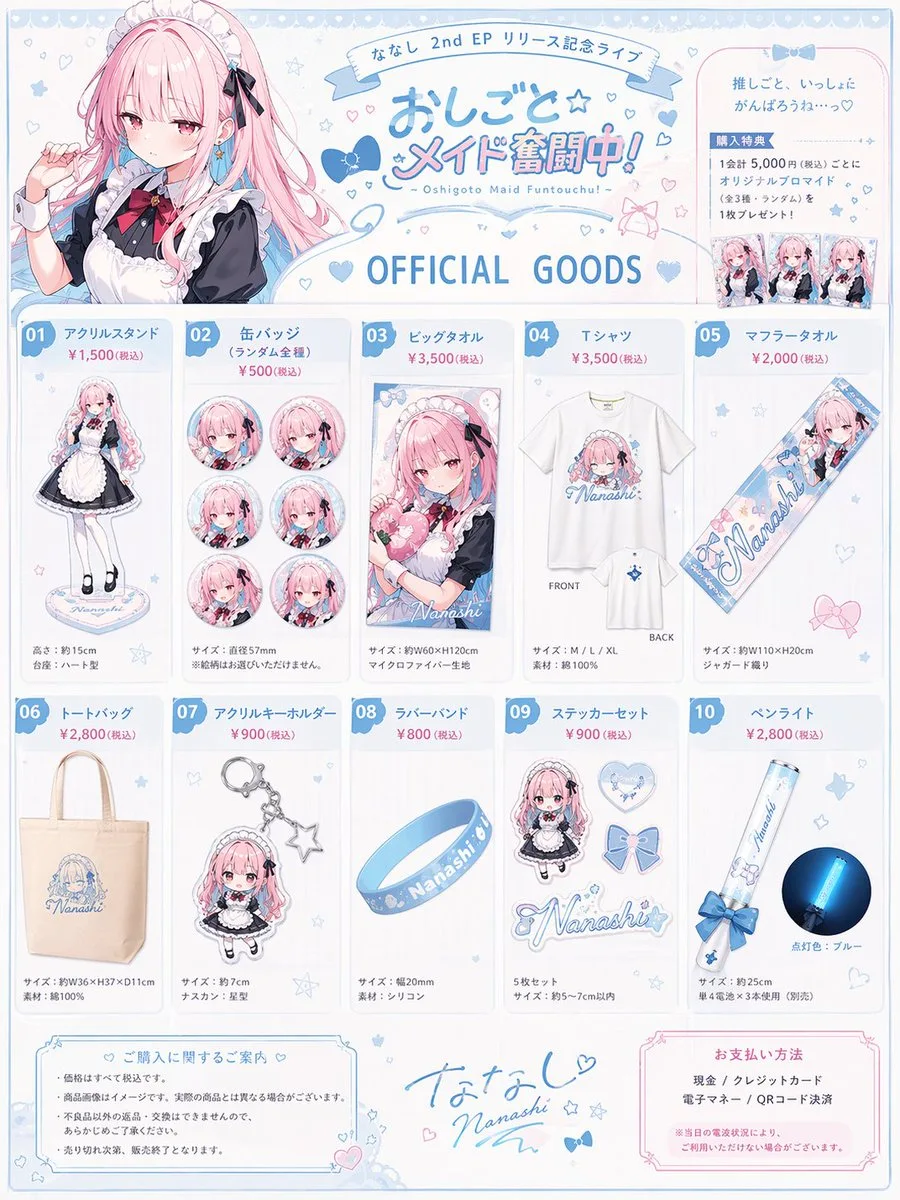
클릭하여 전체 이미지 보기 · 원본 사례 참조용
사례 출처
@anemone_sd ↗ · 사례 #142
원본 사례 내용을 유지합니다. 생성 결과는 모델 버전, 참조 이미지 및 매개변수에 따라 달라질 수 있으며, 본 사이트에서 개별 검증을 진행하지 않아 동일한 결과의 재현을 보장하지 않습니다.
이커머스 제품 / PROMPT #142
실사 사진 스타일 창작 · #142
먼저 이미지를 확인한 뒤 원본 프롬프트를 복사하세요. 치환 문구가 있는 경우 아래에서 원하는 내용으로 변경할 수 있습니다.
01 / 나만의 버전 설정
이 사례에는 명시적인 치환 문구가 없습니다. 복사 후 피사체, 색상, 텍스트, 비율을 직접 수정해 보세요.
02 / 전체 프롬프트 · 원문
{
  "type": "anime idol merchandise catalog flyer",
  "theme_colors": "{argument name=\"theme color\" default=\"pastel blue and pink\"}",
  "character": {
    "name": "{argument name=\"character name\" default=\"ななし\"}",
    "appearance": "anime girl, long {argument name=\"hair color\" default=\"pink\"} hair, blue eyes",
    "attire": "{argument name=\"outfit\" default=\"black and white maid outfit with a red bow tie\"} and blue hair ribbons"
  },
  "layout": {
    "header": {
      "left": "upper body portrait of the character looking slightly to the side",
      "center": {
        "top_banner": "ななし 2nd EP リリース記念ライブ",
        "main_title": "{argument name=\"event title\" default=\"おしごと☆メイド奮闘中!\"}",
        "subtitle": "~ Oshigoto Maid Funtouchu! ~",
        "section_header": "OFFICIAL GOODS"
      },
      "right": "purchase bonus info box containing 3 small rectangular photo prints"
    },
    "merchandise_grid": [
      { "id": "01", "name": "アクリルスタンド", "description": "full body acrylic stand of the character" },
      { "id": "02", "name": "缶バッジ", "description": "set of 6 circular can badges featuring different facial expressions" },
      { "id": "03", "name": "ビッグタオル", "description": "large rectangular towel showing the character holding a heart pillow" },
      { "id": "04", "name": "Tシャツ", "description": "white t-shirt showing FRONT with character graphic and BACK with small logo" },
      { "id": "05", "name": "マフラータオル", "description": "long narrow muffler towel with character art and logo" },
      { "id": "06", "name": "トートバッグ", "description": "canvas tote bag with blue logo" },
      { "id": "07", "name": "アクリルキーホルダー", "description": "chibi character acrylic keychain with a star-shaped clasp" },
      { "id": "08", "name": "ラバーバンド", "description": "blue silicone wristband with logo" },
      { "id": "09", "name": "ステッカーセット", "description": "set of 4 visible stickers: chibi character, heart, ribbon bow, and logo" },
      { "id": "10", "name": "ペンライト", "description": "blue glowing concert penlight" }
    ],
    "footer": {
      "left": "purchase notes and guidelines box",
      "center": "character signature 'Nanashi' with hand-drawn hearts and stars",
      "right": "payment methods box"
    }
  }
}사용하시는 이미지 생성 도구에 붙여넣어 사용하세요. 본 사이트는 프롬프트 탐색 및 편집 기능만 제공하며 직접 이미지를 생성하지 않습니다.
03 / 생성 전 체크리스트
- 치환 문구를 구체적인 내용으로 바꾸고, 참조 이미지가 필요한지 확인하세요.
- 텍스트가 포함된 경우 원하는 문구를 명확히 지정하고, 생성 후 글자를 꼼꼼히 확인하세요.
- 효과를 쉽게 비교할 수 있도록 피사체, 조명, 구도 중 한 번에 하나씩만 수정하세요.
관련 영감 더 둘러보기
더 많은 이커머스 제품 사례