클릭하여 전체 이미지 보기 · 원본 사례 참조용
사례 출처
@makaneko_AI ↗ · 사례 #47
원본 사례 내용을 유지합니다. 생성 결과는 모델 버전, 참조 이미지 및 매개변수에 따라 달라질 수 있으며, 본 사이트에서 개별 검증을 진행하지 않아 동일한 결과의 재현을 보장하지 않습니다.
이커머스 제품 / PROMPT #47
건축 공간 씬 디자인 · #47
먼저 이미지를 확인한 뒤 원본 프롬프트를 복사하세요. 치환 문구가 있는 경우 아래에서 원하는 내용으로 변경할 수 있습니다.
01 / 나만의 버전 설정
02 / 전체 프롬프트 · 원문
{
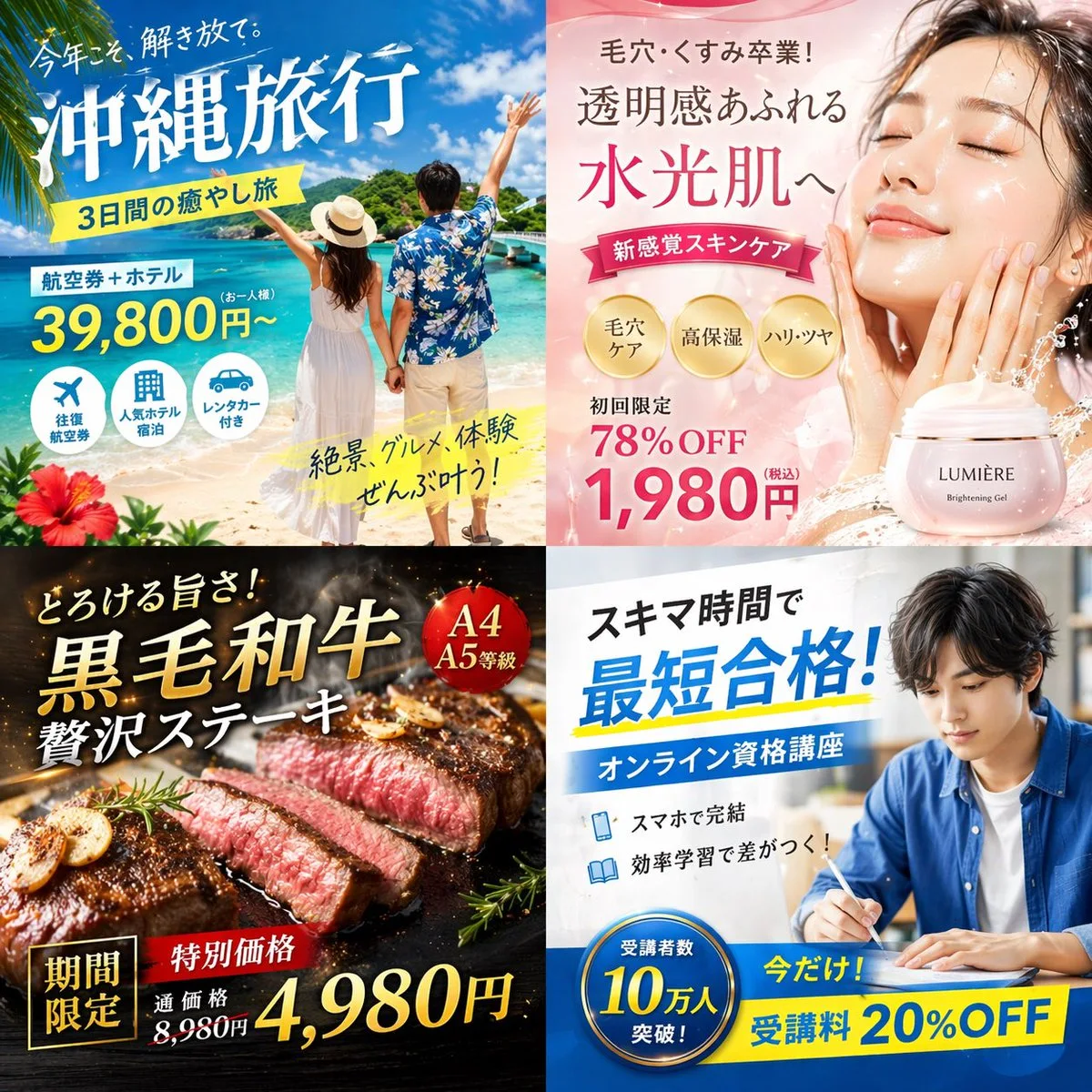
  "type": "2x2 grid of Japanese digital advertisement banners",
  "layout": {
    "structure": "4 equal quadrants",
    "quadrants": [
      {
        "position": "top-left",
        "theme": "Travel",
        "subject": "A couple holding hands on a white sand beach, looking out at turquoise ocean water under a bright blue sky.",
        "elements": ["red hibiscus flower in bottom left corner"],
        "text_labels": [
          "今年こそ、解き放て。",
          "{argument name=\"travel destination\" default=\"沖縄旅行\"}",
          "3日間の癒やし旅",
          "航空券+ホテル",
          "39,800円〜",
          "絶景、グルメ、体験 ぜんぶ叶う!"
        ],
        "icons": {
          "count": 3,
          "descriptions": ["airplane", "hotel building", "car"]
        }
      },
      {
        "position": "top-right",
        "theme": "Skincare",
        "subject": "Close-up portrait of a young woman with glowing, dewy skin, eyes closed, gently touching her cheeks.",
        "elements": [
          "soft pink gradient background",
          "dynamic water splash effects",
          "pink cosmetic jar labeled '{argument name=\"skincare product name\" default=\"LUMIÈRE\"} Brightening Gel'"
        ],
        "text_labels": [
          "毛穴・くすみ卒業!",
          "透明感あふれる",
          "水光肌へ",
          "新感覚スキンケア",
          "初回限定 78%OFF",
          "{argument name=\"discount price\" default=\"1,980円\"}"
        ],
        "badges": {
          "count": 3,
          "style": "gold circular",
          "labels": ["毛穴ケア", "高保湿", "ハリ・ツヤ"]
        }
      },
      {
        "position": "bottom-left",
        "theme": "Gourmet Food",
        "subject": "Thick, sliced, medium-rare steak sizzling on a dark grill plate.",
        "elements": [
          "garlic chips",
          "rosemary sprig",
          "dark background with smoke and glowing embers"
        ],
        "text_labels": [
          "とろける旨さ!",
          "{argument name=\"food item\" default=\"黒毛和牛\"}",
          "贅沢ステーキ",
          "期間限定",
          "特別価格",
          "通常価格 8,980円",
          "4,980円"
        ],
        "badges": {
          "count": 1,
          "style": "red circular",
          "labels": ["A4 A5等級"]
        }
      },
      {
        "position": "bottom-right",
        "theme": "Online Education",
        "subject": "Young man in a blue shirt studying at a desk, writing in a notebook next to an open laptop.",
        "elements": ["bright indoor lighting", "desk environment"],
        "text_labels": [
          "スキマ時間で",
          "{argument name=\"education goal\" default=\"最短合格!\"}",
          "オンライン資格講座",
          "スマホで完結",
          "効率学習で差がつく!",
          "今だけ! 受講料 20%OFF"
        ],
        "badges": {
          "count": 1,
          "style": "blue circular",
          "labels": ["受講者数 10万人 突破!"]
        },
        "icons": {
          "count": 2,
          "descriptions": ["smartphone", "open book"]
        }
      }
    ]
  }
}사용하시는 이미지 생성 도구에 붙여넣어 사용하세요. 본 사이트는 프롬프트 탐색 및 편집 기능만 제공하며 직접 이미지를 생성하지 않습니다.
03 / 생성 전 체크리스트
- 치환 문구를 구체적인 내용으로 바꾸고, 참조 이미지가 필요한지 확인하세요.
- 텍스트가 포함된 경우 원하는 문구를 명확히 지정하고, 생성 후 글자를 꼼꼼히 확인하세요.
- 효과를 쉽게 비교할 수 있도록 피사체, 조명, 구도 중 한 번에 하나씩만 수정하세요.
관련 영감 더 둘러보기
더 많은 이커머스 제품 사례