클릭하여 전체 이미지 보기 · 원본 사례 참조용
사례 출처
@masapark95 ↗ · 사례 #128
원본 사례 내용을 유지합니다. 생성 결과는 모델 버전, 참조 이미지 및 매개변수에 따라 달라질 수 있으며, 본 사이트에서 개별 검증을 진행하지 않아 동일한 결과의 재현을 보장하지 않습니다.
포스터 및 타이포그래피 / PROMPT #128
건축 공간 씬 렌더링
먼저 이미지를 확인한 뒤 원본 프롬프트를 복사하세요. 치환 문구가 있는 경우 아래에서 원하는 내용으로 변경할 수 있습니다.
01 / 나만의 버전 설정
이 사례에는 명시적인 치환 문구가 없습니다. 복사 후 피사체, 색상, 텍스트, 비율을 직접 수정해 보세요.
02 / 전체 프롬프트 · 원문
{
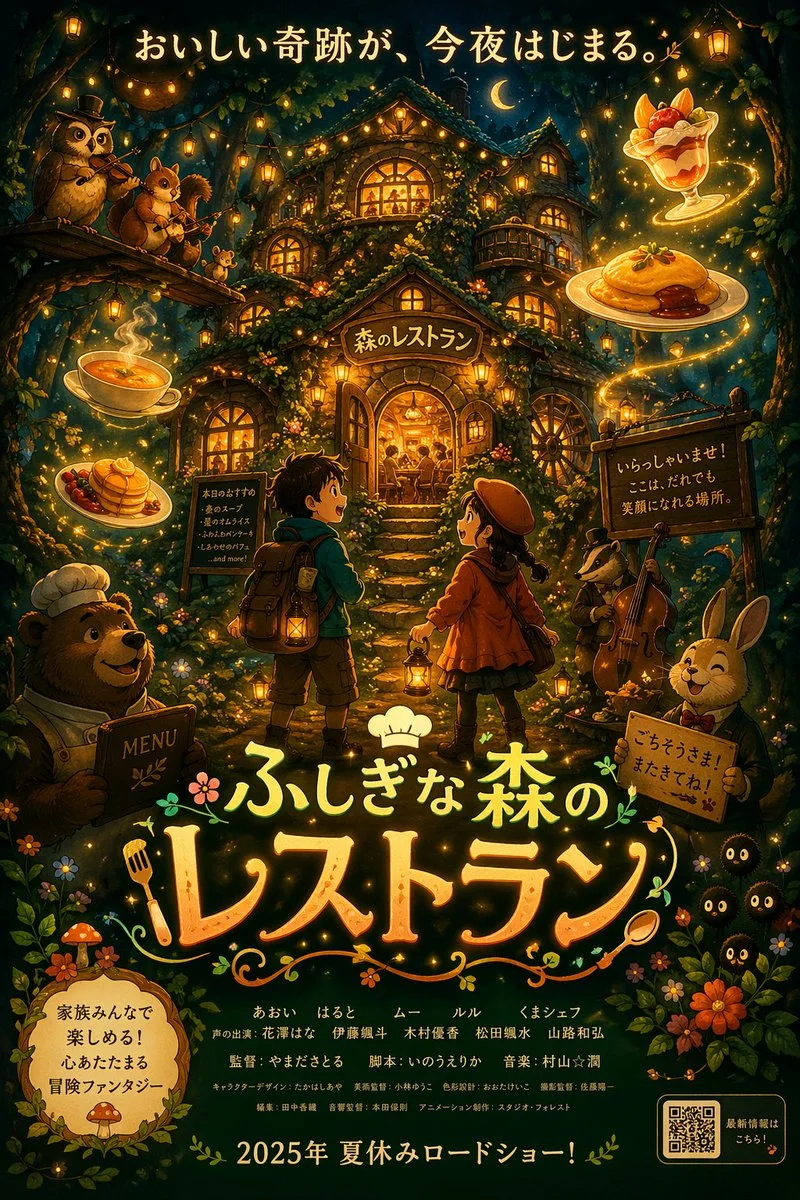
  "type": "anime-style animated movie poster",
  "scene": "Magical glowing multi-story treehouse restaurant in a dark enchanted forest at night, illuminated by string lights and warm window glow.",
  "subjects": {
    "children": "2 children in center foreground facing the restaurant: a boy with a backpack and lantern, and a girl in a red coat and beret with a lantern.",
    "animals": "4 anthropomorphic animals: a bear chef holding a MENU book (bottom left), an owl playing violin and a squirrel playing flute on a branch (top left), a badger playing cello (mid right), and a rabbit in a suit holding a sign (bottom right).",
    "creatures": "3 small black soot-sprite-like creatures with glowing eyes (bottom right).",
    "floating_food": "4 glowing food items floating in the air: soup, pancakes, omurice, and a fruit parfait."
  },
  "layout": {
    "top_text": "{argument name=\"top catchphrase\" default=\"おいしい奇跡が、今夜はじまる。\"}",
    "building_sign": "{argument name=\"restaurant name\" default=\"森のレストラン\"}",
    "left_board": "本日のおすすめ\n・森のスープ\n・星のオムライス\n・ふわふわパンケーキ\n・しあわせのパフェ\n...and more!",
    "right_board": "いらっしゃいませ!\nここは、だれでも\n笑顔になれる場所。",
    "main_title": {
      "text": "{argument name=\"movie title\" default=\"ふしぎな森のレストラン\"}",
      "styling": "Large stylized typography with a chef hat, fork, and spoon motifs."
    },
    "rabbit_sign": "ごちそうさま!またきてね!",
    "bottom_left_badge": "{argument name=\"genre badge\" default=\"家族みんなで楽しめる!心あたたまる冒険ファンタジー\"}",
    "bottom_center_credits": "Fictional cast and staff names in Japanese.",
    "bottom_release_date": "{argument name=\"release date\" default=\"2025年 夏休みロードショー!\"}",
    "bottom_right": "QR code with text '最新情報はこちら!'"
  }
}사용하시는 이미지 생성 도구에 붙여넣어 사용하세요. 본 사이트는 프롬프트 탐색 및 편집 기능만 제공하며 직접 이미지를 생성하지 않습니다.
03 / 생성 전 체크리스트
- 치환 문구를 구체적인 내용으로 바꾸고, 참조 이미지가 필요한지 확인하세요.
- 텍스트가 포함된 경우 원하는 문구를 명확히 지정하고, 생성 후 글자를 꼼꼼히 확인하세요.
- 효과를 쉽게 비교할 수 있도록 피사체, 조명, 구도 중 한 번에 하나씩만 수정하세요.
관련 영감 더 둘러보기
더 많은 포스터 및 타이포그래피 사례