Click to view full image · Reference sample
Source
@highball_cho ↗ · Case #150
Original prompt preserved. Results vary depending on model version, reference image, and parameters; identical outputs are not guaranteed.
Products & E-commerce / PROMPT #150
Brand Logo Design · #150
Review the image, then copy the prompt. If placeholders are present, customize them below.
01 / Customize your version
No placeholders detected. You can freely adjust the subject, color palette, text, and aspect ratio after copying.
02 / Full Prompt · Original
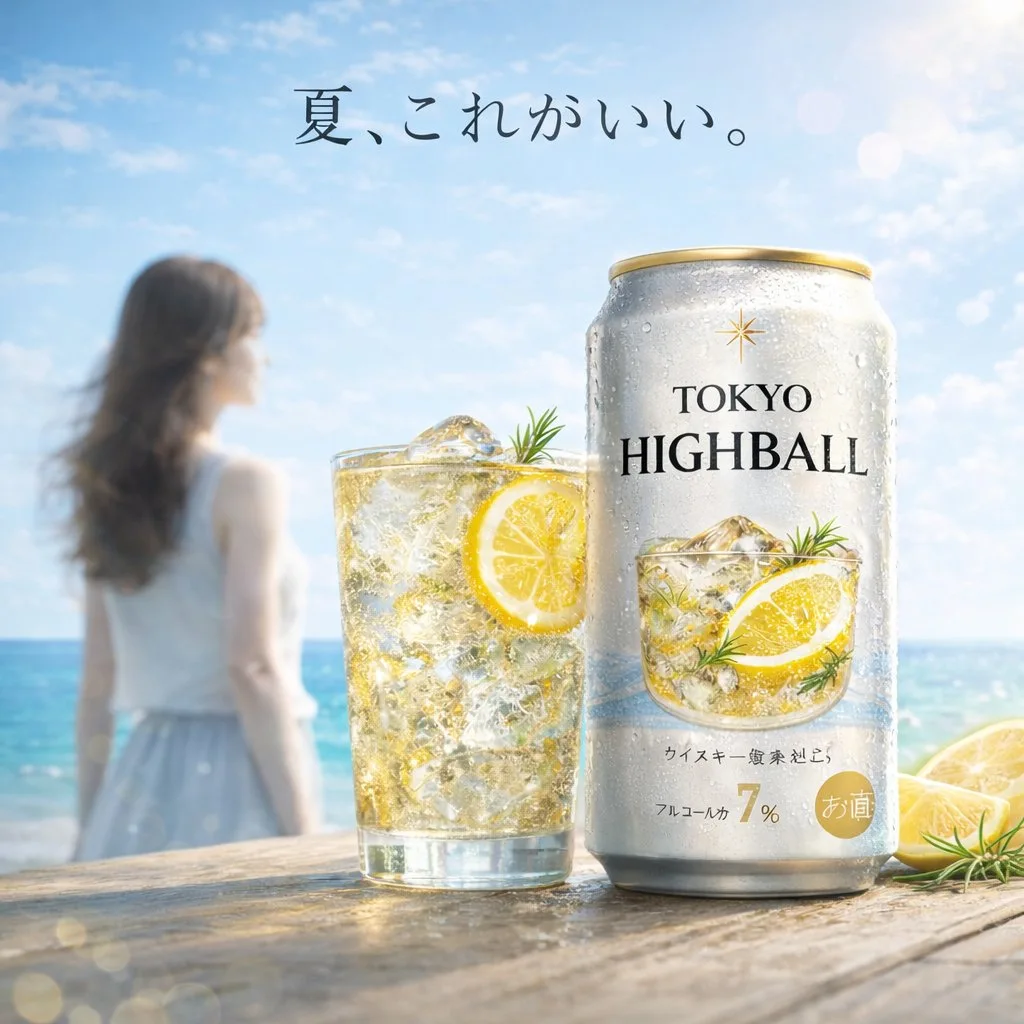
A bright, summery commercial product photography shot featuring a refreshing beverage on a weathered wooden table. In the sharp foreground, there is 1 tall glass filled with a golden, bubbly iced drink garnished with 1 lemon slice and a sprig of rosemary, sitting next to 1 silver aluminum can covered in cold condensation. The can prominently displays the English text {argument name="product name" default="TOKYO HIGHBALL"} below a small gold star logo, featuring a graphic of the drink itself and the Japanese text "アルコール分 7%" near the bottom. To the right of the can, 2 cut lemon wedges rest on the table. In the softly blurred background, a sunny beach scene unfolds with sparkling turquoise water and a clear blue sky. Standing to the left in the background is 1 young woman with long brown hair, wearing a white sleeveless top and a light blue skirt, looking out toward the ocean. Floating elegantly in the sky above the scene is the Japanese text {argument name="catchphrase" default="夏、これがいい。"}. The overall lighting is radiant and inviting, with sparkling bokeh and lens flares emphasizing the crisp, cold, and refreshing atmosphere of a perfect summer day.Copy into your preferred AI image generator. Prompt Atelier provides prompt browsing and editing, but does not generate images directly.
03 / Pre-generation checklist
- Replace placeholders with specific details, and check whether reference images are needed.
- Specify exact wording for text elements, and proofread carefully after generation.
- Adjust only one element at a time—subject, lighting, or composition—to compare results easily.
Explore related inspiration
More in Products & E-commerce