
Clique para ver a imagem completa · Referência do caso original
Fonte do caso
@ShamsAmin56 ↗ · Caso #370
Conteúdo original do caso preservado. Os resultados gerados dependem da versão do modelo, imagens de referência e parâmetros; este site não retestou cada item e não garante a reprodução do mesmo resultado.
Produtos e E-commerce / PROMPT #370
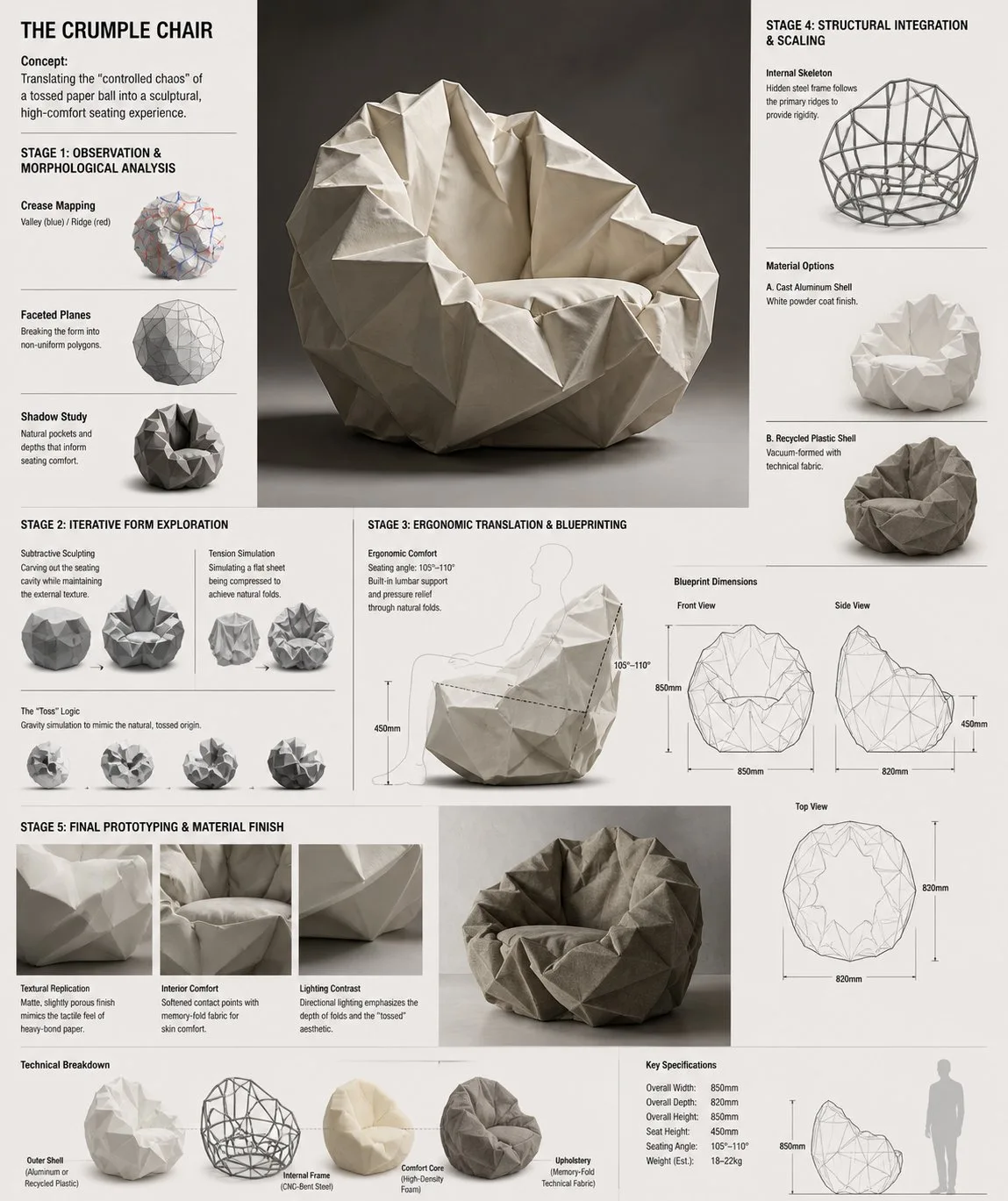
Painel de P&D do Sofá Conceitual Crumple Chair
Veja a imagem primeiro e depois copie o prompt original. Se houver marcadores, substitua-os abaixo com o seu conteúdo.
01 / Configure sua versão
Nenhum marcador detectado neste caso. Após copiar, você pode alterar sujeito, cores, texto na imagem e proporção.
02 / Prompt completo · Original
Design Concept: The Crumple Chair Core Philosophy: Translating the "controlled chaos" of a tossed paper ball into a sculptural, high-comfort seating experience.

Stage 1: Observation & Morphological Analysis The goal is to deconstruct the image of the crumpled paper into usable geometric data. Crease Mapping: Identify the primary "valley" and "ridge" lines. These represent potential structural ribs or seams in the chair. Faceted Planes: Break down the sphere into a series of non-uniform polygons. Each flat surface of the paper becomes a potential panel for the chair’s upholstery or shell. Shadow Study: Analyze how the "tossed" form creates deep recesses. These natural pockets guide where the user’s weight will be cradled.

Stage 2: Iterative Form Exploration Moving from a sphere to a seat through "Digital Crumpling." Subtractive Sculpting: Imagine the paper ball as a solid mass. Use Boolean operations to "carve out" a seating cavity that fits the human form while maintaining the external jagged texture. Tension Simulation: Use 3D software (like Rhino or Blender) to simulate a flat sheet of material being compressed. This ensures the folds look authentic and not "modeled." The "Toss" Logic: Experiment with gravity-based simulation dropping a digital mesh to see how it settles naturally, mimicking the "tossed" origin.

Stage 3: Ergonomic Translation & Blueprinting Refining the raw aesthetic into a functional object. The Comfort Core: Overlay a standard ergonomic template (Seating Angle: 105°–110°) over the crumpled form. Adjust the internal "folds" to provide lumbar support and pressure relief. Blueprint Generation: Create technical orthographic views (Front, Side, Top). Map out the dimensions: Seat Height: 450mm Total Width: 850mm Surface Smoothing: Maintain the sharp "paper edges" on the exterior shell while softening the interior contact points for skin comfort.

Stage 4: Structural Integration & Scaling Making the concept physically viable. The Skeleton: Design a hidden internal frame (likely CNC-bent steel rods or a 3D-printed lattice) that follows the most prominent ridges of the paper folds to provide rigidity. Material Selection: * Option A (High-End): Faceted, cast aluminum with a white powder coat. Option B (Soft): Vacuum-formed recycled plastic shell covered in "memory-fold" technical fabric that retains a wrinkled appearance.

Stage 5: Final Prototyping & Material Finish Textural Replication: Apply a matte, slightly porous finish to the material to mimic the tactile feel of heavy-bond paper. Lighting Contrast: Use directional studio lighting in the final renders to emphasize the "tossed" shadows, making the chair look like a giant piece of discarded inspiration. Design Tip: To keep the "tossed" look authentic, avoid symmetry. The most compelling aspect of a crumpled paper ball is its unique irregularity—ensure the left and right sides of the chair are balance-equivalent but not identical
Copie para a ferramenta de geração de imagens que você usa; este site oferece visualização e edição de prompts, não gera imagens diretamente.
03 / Verificações antes de gerar
- Substitua os marcadores por conteúdo específico e verifique se é necessário enviar uma imagem de referência.
- Para textos na imagem, defina a redação final com clareza e confira letra por letra após gerar.
- Ajuste apenas um elemento por vez (sujeito, iluminação ou composição) para facilitar a comparação dos resultados.
Continue explorando inspirações semelhantes
Mais casos de Produtos e E-commerce


Produtos e E-commerce
Anúncio olho de peixe de bebida gelada de verão dentro do copo
Ver prompt completo ↗#517