클릭하여 전체 이미지 보기 · 원본 사례 참조용
사례 출처
@hx831126 ↗ · 사례 #71
원본 사례 내용을 유지합니다. 생성 결과는 모델 버전, 참조 이미지 및 매개변수에 따라 달라질 수 있으며, 본 사이트에서 개별 검증을 진행하지 않아 동일한 결과의 재현을 보장하지 않습니다.
차트 및 인포그래픽 / PROMPT #71
관계도 인포그래픽 · #71
먼저 이미지를 확인한 뒤 원본 프롬프트를 복사하세요. 치환 문구가 있는 경우 아래에서 원하는 내용으로 변경할 수 있습니다.
01 / 나만의 버전 설정
02 / 전체 프롬프트 · 원문
{
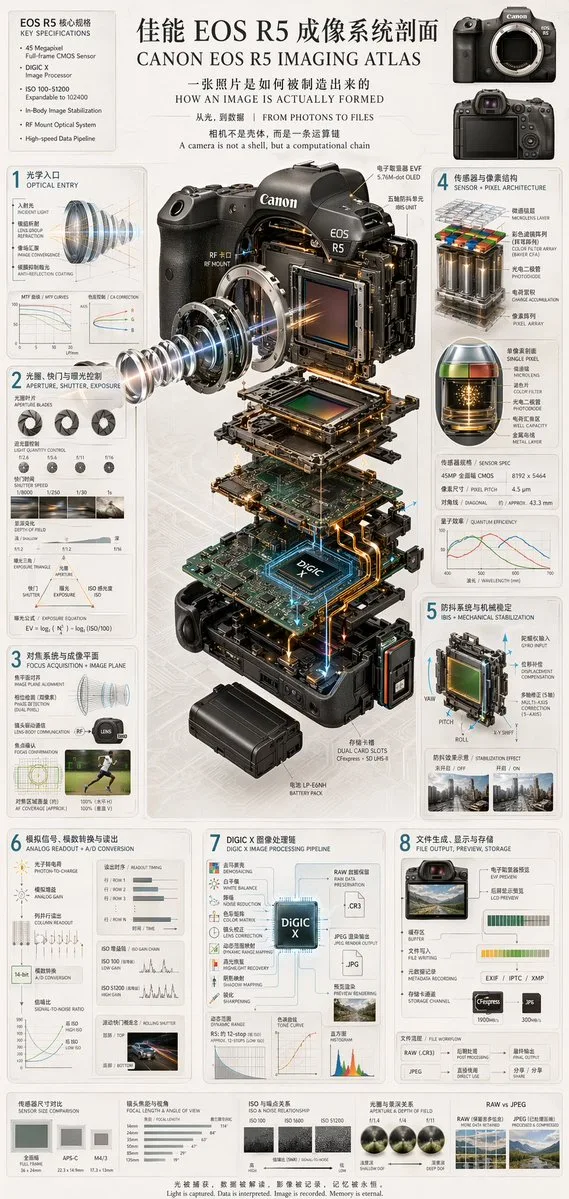
  "type": "technical infographic and exploded view diagram",
  "header": {
    "title": "{argument name=\"main title\" default=\"佳能 EOS R5 成像系统剖面 CANON EOS R5 IMAGING ATLAS\"}",
    "subtitles": [
      "一张照片是如何被制造出来的 HOW AN IMAGE IS ACTUALLY FORMED",
      "从光,到数据 | FROM PHOTONS TO FILES",
      "相机不是壳体,而是一条运算链 A camera is not a shell, but a computational chain"
    ],
    "top_left_box": {
      "title": "EOS R5 核心规格 KEY SPECIFICATIONS",
      "bullet_points_count": 6
    },
    "top_right_images": {
      "count": 2,
      "description": "front and back views of the camera body"
    }
  },
  "centerpiece": {
    "description": "highly detailed 3D exploded view of the {argument name=\"camera model\" default=\"Canon EOS R5\"} camera, showing internal components separated vertically",
    "components_visible": [
      "lens mount",
      "lens elements with glowing blue light rays",
      "image sensor",
      "motherboard with glowing {argument name=\"processor name\" default=\"DIGIC X\"} chip",
      "battery pack",
      "dual card slots",
      "electronic viewfinder (EVF)"
    ]
  },
  "layout": {
    "numbered_sections": [
      {
        "number": 1,
        "title": "光学入口 OPTICAL ENTRY",
        "elements": ["lens cross-section with light rays", "2 line graphs"]
      },
      {
        "number": 2,
        "title": "光圈、快门与曝光控制 APERTURE, SHUTTER, EXPOSURE",
        "elements": ["3 aperture blade diagrams", "4 shutter speed example photos", "depth of field diagram", "exposure triangle diagram"]
      },
      {
        "number": 3,
        "title": "对焦系统与成像平面 FOCUS ACQUISITION + IMAGE PLANE",
        "elements": ["lens alignment diagram", "AF coverage photo of a runner"]
      },
      {
        "number": 4,
        "title": "传感器与像素结构 SENSOR + PIXEL ARCHITECTURE",
        "elements": ["3D pixel array diagram", "single pixel cross-section diagram", "sensor spec table", "quantum efficiency graph"]
      },
      {
        "number": 5,
        "title": "防抖系统与机械稳定 IBIS + MECHANICAL STABILIZATION",
        "elements": ["sensor shift mechanism diagram with yaw/pitch/roll axes", "2 stabilization effect comparison photos"]
      },
      {
        "number": 6,
        "title": "模拟信号、模数转换与读出 ANALOG READOUT + A/D CONVERSION",
        "elements": ["signal flowchart", "3 readout timing graphs", "signal-to-noise ratio graph", "rolling shutter example photo of a car"]
      },
      {
        "number": 7,
        "title": "DIGIC X 图像处理链 DIGIC X IMAGE PROCESSING PIPELINE",
        "elements": ["processing flowchart with central chip", "dynamic range graph", "tone curve graph", "histogram"]
      },
      {
        "number": 8,
        "title": "文件生成、显示与存储 FILE OUTPUT, PREVIEW, STORAGE",
        "elements": ["file output flowchart", "2 storage card icons", "file workflow diagram"]
      }
    ],
    "bottom_comparisons": {
      "count": 5,
      "labels": [
        "传感器尺寸对比 SENSOR SIZE COMPARISON",
        "镜头焦距与视角 FOCAL LENGTH & ANGLE OF VIEW",
        "ISO 与噪点关系 ISO & NOISE RELATIONSHIP",
        "光圈与景深关系 APERTURE & DEPTH OF FIELD",
        "RAW vs JPEG"
      ]
    },
    "footer": "{argument name=\"footer quote\" default=\"光被捕获,数据被解读,影像被记录,记忆被永恒。 Light is captured. Data is interpreted. Image is recorded. Memory is eternal.\"}"
  },
  "style": "clean, technical, highly detailed, photorealistic components, blueprint-style annotations, light gray background, precise typography"
}사용하시는 이미지 생성 도구에 붙여넣어 사용하세요. 본 사이트는 프롬프트 탐색 및 편집 기능만 제공하며 직접 이미지를 생성하지 않습니다.
03 / 생성 전 체크리스트
- 치환 문구를 구체적인 내용으로 바꾸고, 참조 이미지가 필요한지 확인하세요.
- 텍스트가 포함된 경우 원하는 문구를 명확히 지정하고, 생성 후 글자를 꼼꼼히 확인하세요.
- 효과를 쉽게 비교할 수 있도록 피사체, 조명, 구도 중 한 번에 하나씩만 수정하세요.
관련 영감 더 둘러보기
더 많은 차트 및 인포그래픽 사례