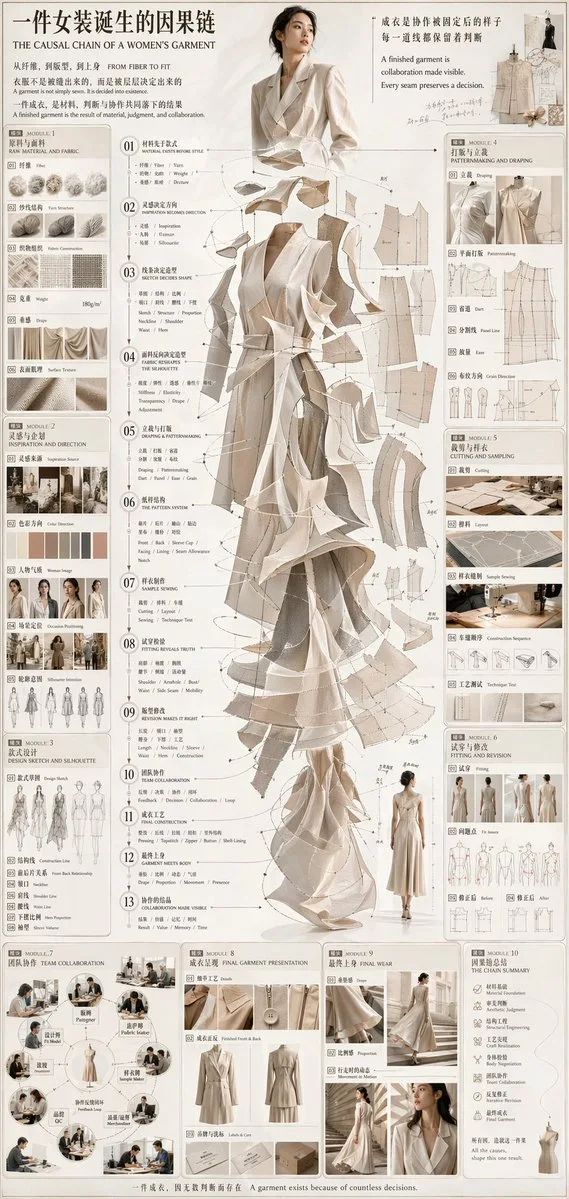
클릭하여 전체 이미지 보기 · 원본 사례 참조용
사례 출처
@hx831126 ↗ · 사례 #66
원본 사례 내용을 유지합니다. 생성 결과는 모델 버전, 참조 이미지 및 매개변수에 따라 달라질 수 있으며, 본 사이트에서 개별 검증을 진행하지 않아 동일한 결과의 재현을 보장하지 않습니다.
차트 및 인포그래픽 / PROMPT #66
인포그래픽 시각화 디자인 · #66
먼저 이미지를 확인한 뒤 원본 프롬프트를 복사하세요. 치환 문구가 있는 경우 아래에서 원하는 내용으로 변경할 수 있습니다.
01 / 나만의 버전 설정
02 / 전체 프롬프트 · 원문
{
  "type": "fashion design process infographic",
  "title": "{argument name=\"main title\" default=\"一件女装诞生的因果链 THE CAUSAL CHAIN OF A WOMEN'S GARMENT\"}",
  "subtitle": "从纤维,到版型,到上身 FROM FIBER TO FIT",
  "style": {
    "aesthetic": "elegant editorial, technical fashion illustration, highly detailed",
    "color_palette": "{argument name=\"color palette\" default=\"beige, cream, and neutral tones\"}"
  },
  "layout": {
    "centerpiece": {
      "description": "Exploded-view illustration of a {argument name=\"garment type\" default=\"women's trench coat dress\"} showing cascading layers of fabric, pattern pieces, and stitching lines. Top shows a model wearing the finished garment.",
      "central_list": {
        "count": 13,
        "type": "numbered steps with pointer lines",
        "labels": ["01 Material", "02 Inspiration", "03 Sketch", "04 Fabric", "05 Draping", "06 Pattern", "07 Sewing", "08 Fitting", "09 Revision", "10 Team", "11 Construction", "12 Garment", "13 Collaboration"]
      }
    },
    "left_column": [
      {
        "module": "MODULE 1: RAW MATERIAL AND FABRIC",
        "count": 6,
        "items": ["Fiber", "Yarn Structure", "Fabric Construction", "Weight", "Drape", "Surface Texture"]
      },
      {
        "module": "MODULE 2: INSPIRATION AND DIRECTION",
        "count": 5,
        "items": ["Inspiration Source", "Color Direction", "Woman Image", "Occasion Positioning", "Silhouette Intention"]
      },
      {
        "module": "MODULE 3: DESIGN SKETCH AND SILHOUETTE",
        "count": 7,
        "items": ["Design Sketch", "Construction Line", "Front Back Relationship", "Neckline", "Shoulder Line", "Waist Line", "Hem Proportion"]
      }
    ],
    "right_column": [
      {
        "module": "MODULE 4: PATTERNMAKING AND DRAPING",
        "count": 6,
        "items": ["Draping", "Patternmaking", "Dart", "Panel Line", "Ease", "Grain Direction"]
      },
      {
        "module": "MODULE 5: CUTTING AND SAMPLING",
        "count": 5,
        "items": ["Cutting", "Layout", "Sample Sewing", "Construction Sequence", "Technique Test"]
      },
      {
        "module": "MODULE 6: FITTING AND REVISION",
        "count": 4,
        "items": ["Fitting", "Fit Issues", "Before", "After"]
      }
    ],
    "bottom_row": [
      {
        "module": "MODULE 7: TEAM COLLABORATION",
        "count": 8,
        "items": ["Designer", "Patternmaker", "Fabric Buyer", "Sample Maker", "Merchandiser", "QC", "Feedback Loop", "Model"]
      },
      {
        "module": "MODULE 8: FINAL GARMENT PRESENTATION",
        "count": 3,
        "items": ["Details", "Finished Front & Back", "Labels & Care"]
      },
      {
        "module": "MODULE 9: FINAL WEAR",
        "count": 3,
        "items": ["Drape", "Proportion", "Movement in Motion"]
      },
      {
        "module": "MODULE 10: THE CHAIN SUMMARY",
        "count": 8,
        "items": ["Material Foundation", "Aesthetic Judgment", "Structural Engineering", "Craft Realization", "Body Negotiation", "Team Collaboration", "Iterative Revision", "Final Garment"]
      }
    ],
    "footer": "{argument name=\"footer text\" default=\"一件成衣,因无数判断而存在 A garment exists because of countless decisions.\"}"
  }
}사용하시는 이미지 생성 도구에 붙여넣어 사용하세요. 본 사이트는 프롬프트 탐색 및 편집 기능만 제공하며 직접 이미지를 생성하지 않습니다.
03 / 생성 전 체크리스트
- 치환 문구를 구체적인 내용으로 바꾸고, 참조 이미지가 필요한지 확인하세요.
- 텍스트가 포함된 경우 원하는 문구를 명확히 지정하고, 생성 후 글자를 꼼꼼히 확인하세요.
- 효과를 쉽게 비교할 수 있도록 피사체, 조명, 구도 중 한 번에 하나씩만 수정하세요.
관련 영감 더 둘러보기
더 많은 차트 및 인포그래픽 사례