클릭하여 전체 이미지 보기 · 원본 사례 참조용
사례 출처
@iamaiistudio ↗ · 사례 #477
원본 사례 내용을 유지합니다. 생성 결과는 모델 버전, 참조 이미지 및 매개변수에 따라 달라질 수 있으며, 본 사이트에서 개별 검증을 진행하지 않아 동일한 결과의 재현을 보장하지 않습니다.
장면 및 스토리텔링 / PROMPT #477
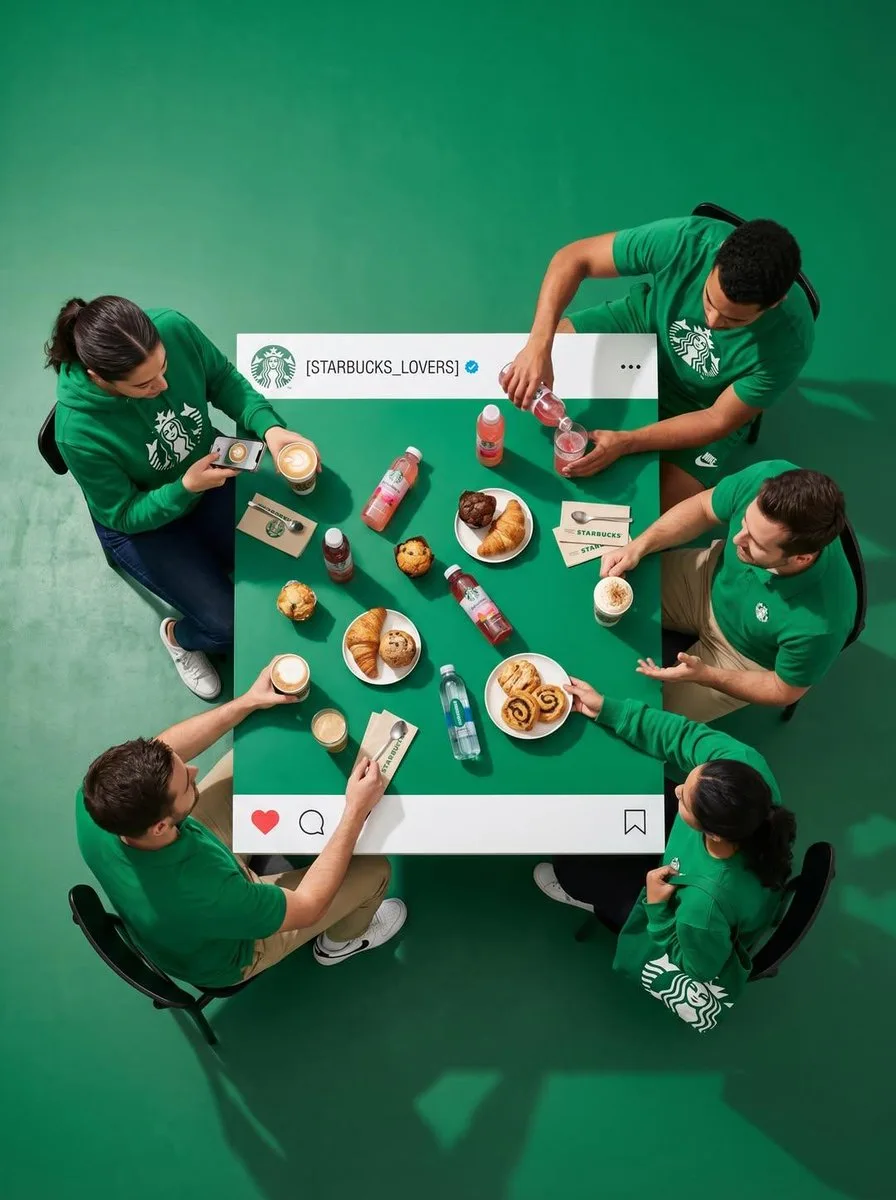
Instagram 식탁 부감 크리에이티브
먼저 이미지를 확인한 뒤 원본 프롬프트를 복사하세요. 치환 문구가 있는 경우 아래에서 원하는 내용으로 변경할 수 있습니다.
01 / 나만의 버전 설정
02 / 전체 프롬프트 · 원문
Top-down ultra-wide hyper-realistic shot of 4 real people seated at a square dining table. Pull the camera way back so a wide ring of empty floor surrounds the whole scene, giving a clean minimal composition. Scene [ATMOSPHERE + WARDROBE]: the four are styled in [OUTFIT STYLE]. Each one is doing something specific: [DESCRIBE EACH PERSON'S ACTION].

The table itself is a physical prop built to look like an Instagram post viewed from above:
- A solid white band runs along the TOP and BOTTOM edges only, with no white on the left or right sides.
- Top band: a small drawn profile avatar with [LOGO DESCRIPTION], the handle "[USERNAME]", a tiny blue verified check next to it, and a "..." on the far right.
- Bottom band: red heart, comment bubble, and share icons painted on the left, bookmark icon on the right.

The center of the table is one flat color: [EXACT COLOR + HEX CODE]. All food, drinks, props, and any hand interacting with them must stay strictly inside that central colored zone, nothing crosses the white bands or the table edge. The floor around the table is [FLOOR COLOR] to create clear visual separation. Professional studio lighting with crisp shadows, 8k, tack-sharp focus.
사용하시는 이미지 생성 도구에 붙여넣어 사용하세요. 본 사이트는 프롬프트 탐색 및 편집 기능만 제공하며 직접 이미지를 생성하지 않습니다.
03 / 생성 전 체크리스트
- 치환 문구를 구체적인 내용으로 바꾸고, 참조 이미지가 필요한지 확인하세요.
- 텍스트가 포함된 경우 원하는 문구를 명확히 지정하고, 생성 후 글자를 꼼꼼히 확인하세요.
- 효과를 쉽게 비교할 수 있도록 피사체, 조명, 구도 중 한 번에 하나씩만 수정하세요.
관련 영감 더 둘러보기
더 많은 장면 및 스토리텔링 사례