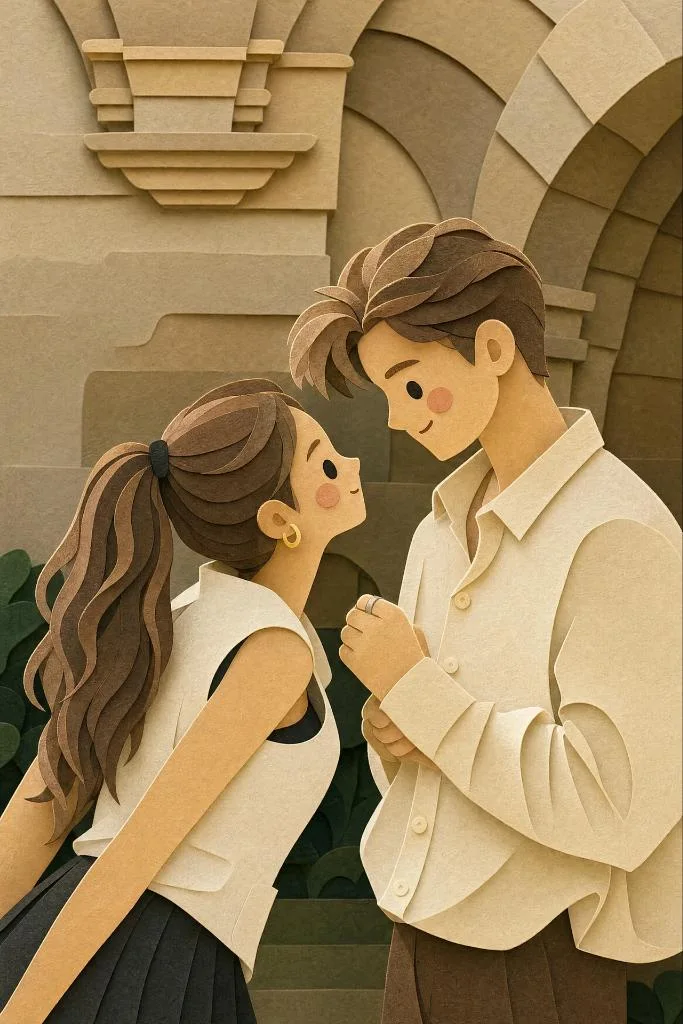
클릭하여 전체 이미지 보기 · 원본 사례 참조용
사례 출처
@Just_sharon7 ↗ · 사례 #435
원본 사례 내용을 유지합니다. 생성 결과는 모델 버전, 참조 이미지 및 매개변수에 따라 달라질 수 있으며, 본 사이트에서 개별 검증을 진행하지 않아 동일한 결과의 재현을 보장하지 않습니다.
일러스트 및 아트 / PROMPT #435
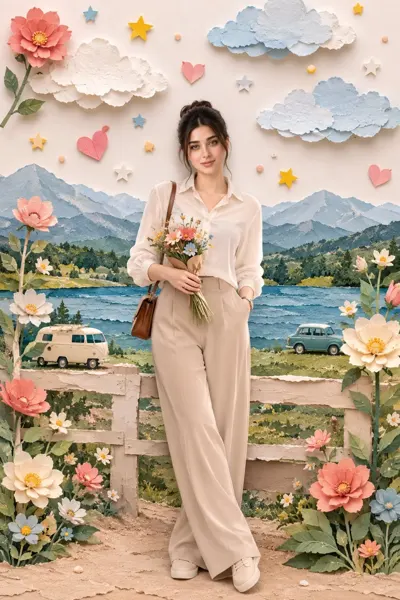
레이어드 페이퍼 아트 커플 일러스트
먼저 이미지를 확인한 뒤 원본 프롬프트를 복사하세요. 치환 문구가 있는 경우 아래에서 원하는 내용으로 변경할 수 있습니다.
01 / 나만의 버전 설정
이 사례에는 명시적인 치환 문구가 없습니다. 복사 후 피사체, 색상, 텍스트, 비율을 직접 수정해 보세요.
02 / 전체 프롬프트 · 원문
{
  "style": "layered paper-cut illustration, papercraft diorama, handcrafted aesthetic",
  "technique": {
    "layering": "multiple stacked paper layers with soft drop shadows between each layer",
    "depth": "5–7 visible depth planes from foreground to background",
    "edges": "smooth, rounded, slightly beveled paper-cut edges",
    "texture": "subtle paper grain and fibrous texture on all surfaces",
    "shadows": "soft, diffused inner shadows beneath each layer suggesting physical depth"
  },
  "character_design": {
    "proportions": "chibi / cute simplified — large round head, small body (1:1.5 ratio)",
    "face": {
      "eyes": "small dot eyes, glossy highlight",
      "cheeks": "soft circular rosy blush patches",
      "nose": "absent or minimal dot",
      "mouth": "simple small curve smile"
    },
    "limbs": "short, rounded, stubby limbs",
    "outline": "clean smooth silhouette, no sharp corners"
  },
  "color_palette": {
    "mood": "warm, cozy, pastel",
    "tones": ["soft cream", "dusty rose", "sage green", "warm peach", "sky blue", "honey yellow"],
    "saturation": "low-to-medium, muted and gentle",
    "background": "warm off-white or soft gradient"
  },
  "lighting": {
    "type": "soft ambient light from top-front",
    "highlights": "gentle white edge highlights on top layers",
    "shadows": "warm light tan/beige shadow tones beneath cut layers"
  },
  "environment": {
    "foliage": "simplified rounded leaf and floral shapes as separate paper layers",
    "ground": "curved horizon layers suggesting rolling hills",
    "details": "tiny decorative elements — stars, small hearts, dots — cut from paper"
  },
  "overall_mood": "warm, whimsical, cozy, handmade, storybook",
  "render_quality": "ultra-detailed papercraft art, studio photography lighting, sharp focus on layer edges"
}사용하시는 이미지 생성 도구에 붙여넣어 사용하세요. 본 사이트는 프롬프트 탐색 및 편집 기능만 제공하며 직접 이미지를 생성하지 않습니다.
03 / 생성 전 체크리스트
- 치환 문구를 구체적인 내용으로 바꾸고, 참조 이미지가 필요한지 확인하세요.
- 텍스트가 포함된 경우 원하는 문구를 명확히 지정하고, 생성 후 글자를 꼼꼼히 확인하세요.
- 효과를 쉽게 비교할 수 있도록 피사체, 조명, 구도 중 한 번에 하나씩만 수정하세요.
관련 영감 더 둘러보기
더 많은 일러스트 및 아트 사례