클릭하여 전체 이미지 보기 · 원본 사례 참조용
사례 출처
@Fujimoto_hina ↗ · 사례 #316
원본 사례 내용을 유지합니다. 생성 결과는 모델 버전, 참조 이미지 및 매개변수에 따라 달라질 수 있으며, 본 사이트에서 개별 검증을 진행하지 않아 동일한 결과의 재현을 보장하지 않습니다.
일러스트 및 아트 / PROMPT #316
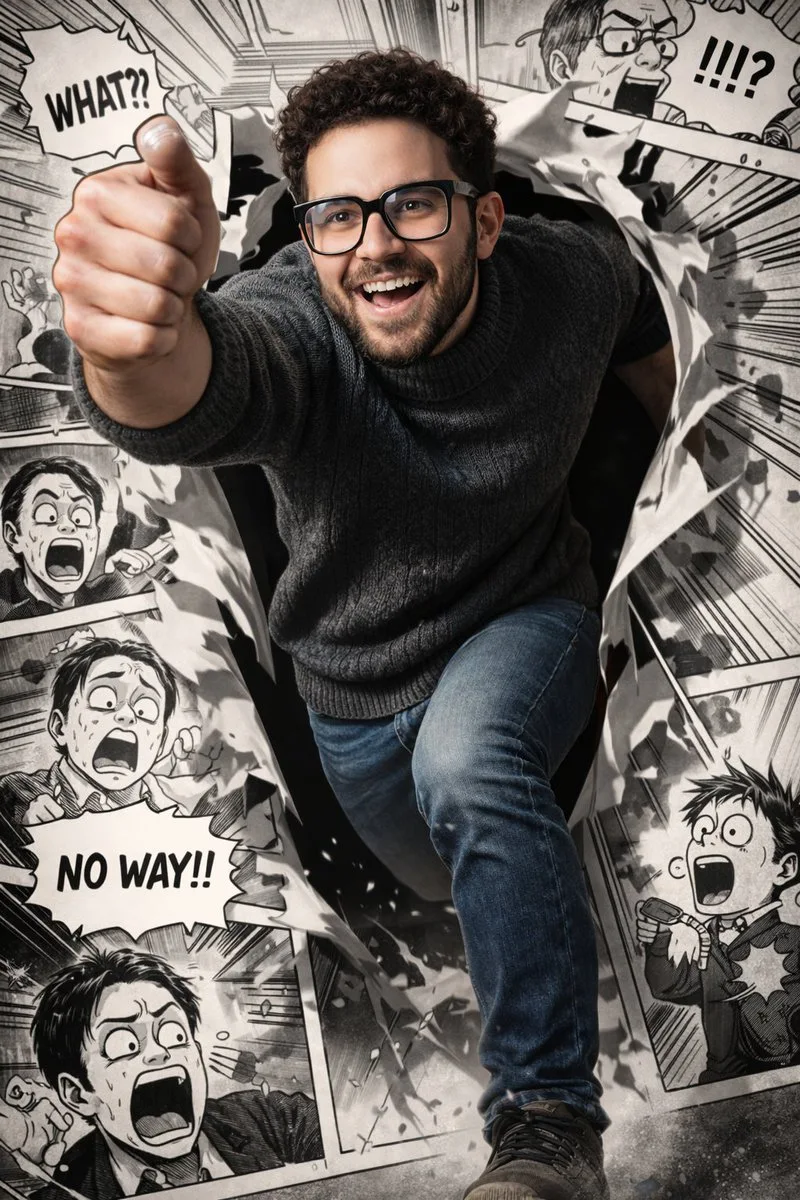
차원을 뚫고 나온 실사 만화 러너
먼저 이미지를 확인한 뒤 원본 프롬프트를 복사하세요. 치환 문구가 있는 경우 아래에서 원하는 내용으로 변경할 수 있습니다.
01 / 나만의 버전 설정
02 / 전체 프롬프트 · 원문
[中文]
{
  "prompt": "超写实,一位留着深色短卷发、修剪整齐的胡须和黑色方形眼镜的年轻男子的鲜艳逼真渲染,身穿深色纹理高领毛衣和牛仔裤。他奔跑到一半被捕捉下来,姿态充满动感,向前突破,充满戏剧性地从一个破碎的漫画分镜框中显现——一条腿和一只手臂冲入现实世界,而身体的其余部分仍留在漫画框内。他的表情充满活力和喜悦,拥有锐利的面部细节,自然的皮肤纹理,以及具有高对比度和深度的戏剧性电影灯光。\n\n背景:一个非常详细的黑白漫画布局,充满了幽默、夸张的且与他直接互动的反应场景。周围的漫画人物表现出震惊和喜剧的表情,配有粗体的对话气泡和速度线。漫画分镜采用经典的高对比度水墨风格绘制,线条清晰,网点阴影。撕裂的纸张边缘和碎片增强了他冲破漫画世界的幻觉。全彩色的写实人物与单色的漫画环境形成强烈对比,创造出写实与漫画艺术之间的动态混合体。超精细,8k分辨率,清晰聚焦,戏剧性的阴影,电影级景深。"
}

[English]
{
  "prompt": "Ultra-realistic, vibrant photorealistic rendering of a young man with short curly dark hair, neatly trimmed beard, and black rectangular glasses, wearing a dark textured turtleneck sweater and jeans. He is captured mid-run in a dynamic, forward-breaking pose, dramatically emerging from a torn manga panel — one leg and one arm bursting into the real world while the rest of his body remains inside the comic frame. His expression is energetic and joyful, with sharp facial details, natural skin texture, and dramatic cinematic lighting with high contrast and depth. \n\nBackground: a highly detailed black-and-white manga layout filled with humorous, exaggerated reaction scenes that directly interact with him. The surrounding manga characters display shocked and comedic expressions, with bold speech bubbles and motion lines. The manga panels are illustrated in a classic high-contrast ink style with crisp linework and halftone shading. Torn paper edges and debris enhance the illusion of him breaking through the comic world. The fully colored, photorealistic figure contrasts strongly against the monochrome manga environment, creating a dynamic hybrid between reality and comic art. Ultra-detailed, 8k resolution, sharp focus, dramatic shadows, cinematic depth of field."
}사용하시는 이미지 생성 도구에 붙여넣어 사용하세요. 본 사이트는 프롬프트 탐색 및 편집 기능만 제공하며 직접 이미지를 생성하지 않습니다.
03 / 생성 전 체크리스트
- 치환 문구를 구체적인 내용으로 바꾸고, 참조 이미지가 필요한지 확인하세요.
- 텍스트가 포함된 경우 원하는 문구를 명확히 지정하고, 생성 후 글자를 꼼꼼히 확인하세요.
- 효과를 쉽게 비교할 수 있도록 피사체, 조명, 구도 중 한 번에 하나씩만 수정하세요.
관련 영감 더 둘러보기
더 많은 일러스트 및 아트 사례