Click to view full image · Reference sample
Source
@Ciri_ai ↗ · Case #436
Original prompt preserved. Results vary depending on model version, reference image, and parameters; identical outputs are not guaranteed.
Photography & Realism / PROMPT #436
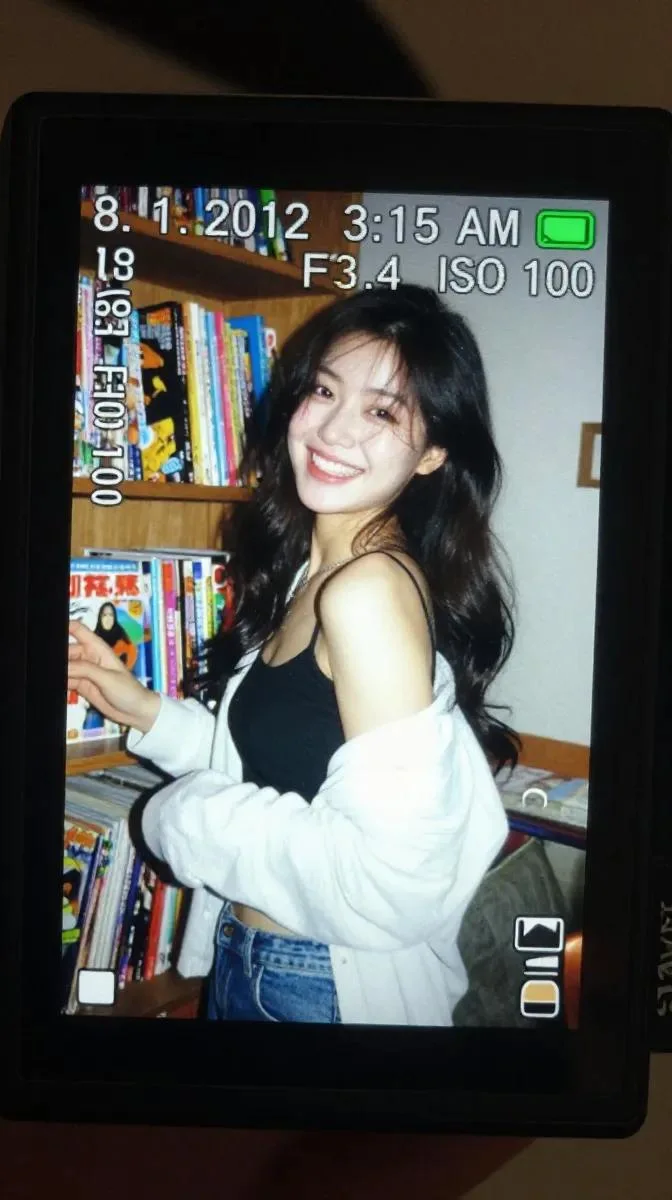
Digital Camera Screen Nostalgic Portrait
Review the image, then copy the prompt. If placeholders are present, customize them below.
01 / Customize your version
No placeholders detected. You can freely adjust the subject, color palette, text, and aspect ratio after copying.
02 / Full Prompt · Original
A realistic close-up shot of a small digital camera screen glowing brightly in a dark indoor environment. Displayed on the LCD is a candid early-2010s style photograph of a young East Asian woman with long dark wavy hair standing beside a wooden shelf packed tightly with colorful comic books and magazines.

She wears a black spaghetti-strap top with a loose white cardigan hanging casually from both shoulders and faded blue jeans. Captured mid-laugh while turning her face slightly sideways, her expression feels spontaneous and natural, with hair falling softly across part of her cheek.

The harsh direct flash from the compact camera creates strong highlights on her face and cardigan while flattening shadows in the background, producing an authentic nostalgic digicam aesthetic. Slight motion blur and digital grain enhance the candid realism.

Camera UI overlays are visible across the LCD screen, including the timestamp “8. 1. 2012 3:15 AM,” exposure data “1/30 F3.4 ISO 100,” focus indicators, and a small green battery symbol in the corner.

The image preserves visible screen pixel structure, slight glare reflections, chromatic softness, and compressed digital texture. Outside the LCD, the surrounding darkness fades smoothly into blur, emphasizing the glowing nostalgic screen.

Shot to resemble an authentic Sony Cyber-shot point-and-shoot camera from the early 2010s using a CCD sensor with vintage digital rendering and imperfect flash exposure.
Copy into your preferred AI image generator. Prompt Atelier provides prompt browsing and editing, but does not generate images directly.
03 / Pre-generation checklist
- Replace placeholders with specific details, and check whether reference images are needed.
- Specify exact wording for text elements, and proofread carefully after generation.
- Adjust only one element at a time—subject, lighting, or composition—to compare results easily.
Explore related inspiration
More in Photography & Realism