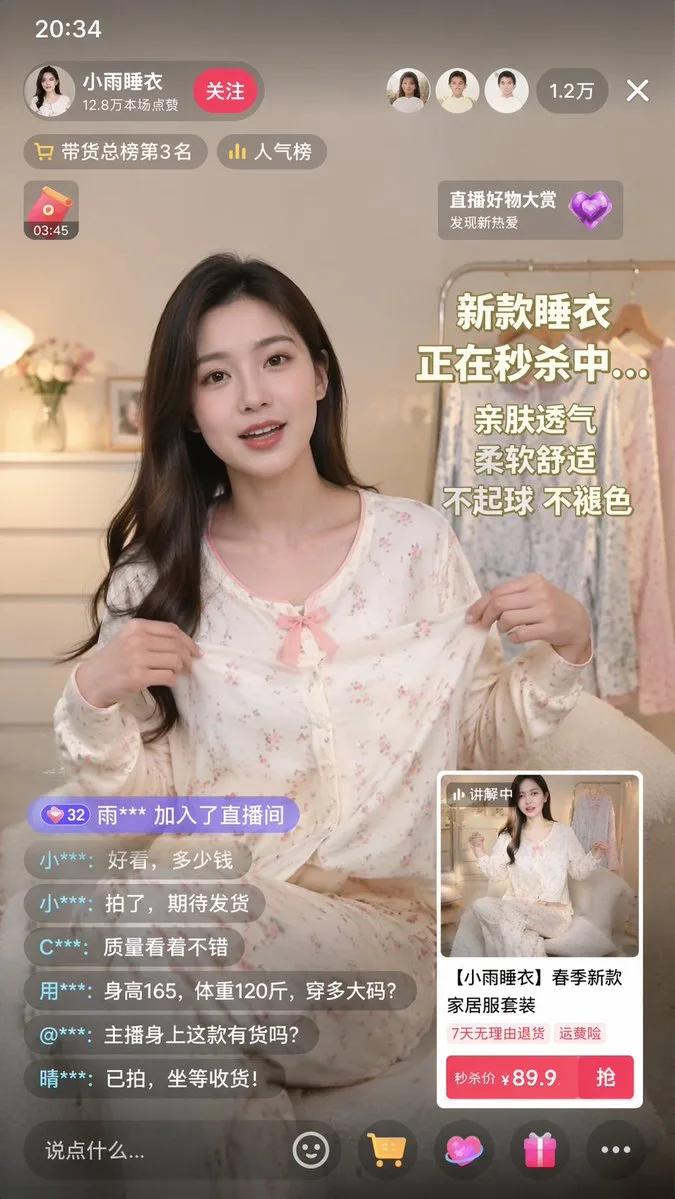
Click to view full image · Reference sample
Source
@linxiaobei888 ↗ · Case #156
Original prompt preserved. Results vary depending on model version, reference image, and parameters; identical outputs are not guaranteed.
UI & Interfaces / PROMPT #156
App UI Mockup · #156
Review the image, then copy the prompt. If placeholders are present, customize them below.
01 / Customize your version
02 / Full Prompt · Original
{
  "type": "mobile live-streaming e-commerce interface mockup",
  "subject": {
    "description": "young Asian woman, long dark hair, wearing light-colored floral pajama set with a pink bow, holding the pajama top outward to show the fabric",
    "background": "cozy room, clothing rack with pajamas, flowers, warm lighting"
  },
  "ui_layout": {
    "top_bar": {
      "time": "20:34",
      "host_info": {
        "name": "{argument name=\"host name\" default=\"小雨睡衣\"}",
        "stats": "12.8万本场点赞",
        "button": "关注"
      },
      "viewer_info": {
        "avatars_count": 3,
        "total_viewers": "1.2万"
      }
    },
    "floating_tags": {
      "count": 2,
      "labels": ["带货总榜第3名", "人气榜"]
    },
    "widgets": {
      "top_left": "red envelope icon with timer 03:45",
      "top_right": "floating heart icon with text 直播好物大赏 发现新热爱"
    },
    "marketing_text_overlay": {
      "position": "mid-right",
      "lines_count": 5,
      "lines": [
        "{argument name=\"main headline\" default=\"新款睡衣\"}",
        "{argument name=\"sub headline\" default=\"正在秒杀中...\"}",
        "亲肤透气",
        "柔软舒适",
        "不起球 不褪色"
      ]
    },
    "chat_log": {
      "position": "bottom-left",
      "message_count": 7,
      "messages": [
        "32 雨*** 加入了直播间",
        "小***: 好看,多少钱",
        "小***: 拍了,期待发货",
        "C***: 质量看着不错",
        "用***: 身高165,体重120斤,穿多大码?",
        "@***: 主播身上这款有货吗?",
        "晴***: 已拍,坐等收货!"
      ]
    },
    "product_card": {
      "position": "bottom-right",
      "thumbnail": "miniature of the host",
      "title": "{argument name=\"product title\" default=\"【小雨睡衣】春季新款家居服套装\"}",
      "tags_count": 2,
      "tags": ["7天无理由退货", "运费险"],
      "price_section": "秒杀价 ¥ {argument name=\"product price\" default=\"89.9\"}",
      "action_button": "抢"
    },
    "bottom_bar": {
      "input_placeholder": "说点什么...",
      "icon_count": 5,
      "icons": ["smiley face", "shopping cart", "heart/gift", "gift box", "three dots"]
    }
  }
}
Copy into your preferred AI image generator. Prompt Atelier provides prompt browsing and editing, but does not generate images directly.
03 / Pre-generation checklist
- Replace placeholders with specific details, and check whether reference images are needed.
- Specify exact wording for text elements, and proofread carefully after generation.
- Adjust only one element at a time—subject, lighting, or composition—to compare results easily.
Explore related inspiration
More in UI & Interfaces