Click to view full image · Reference sample
Source
@tehno_maniak ↗ · Case #107
Original prompt preserved. Results vary depending on model version, reference image, and parameters; identical outputs are not guaranteed.
UI & Interfaces / PROMPT #107
App UI Mockup · #107
Review the image, then copy the prompt. If placeholders are present, customize them below.
01 / Customize your version
02 / Full Prompt · Original
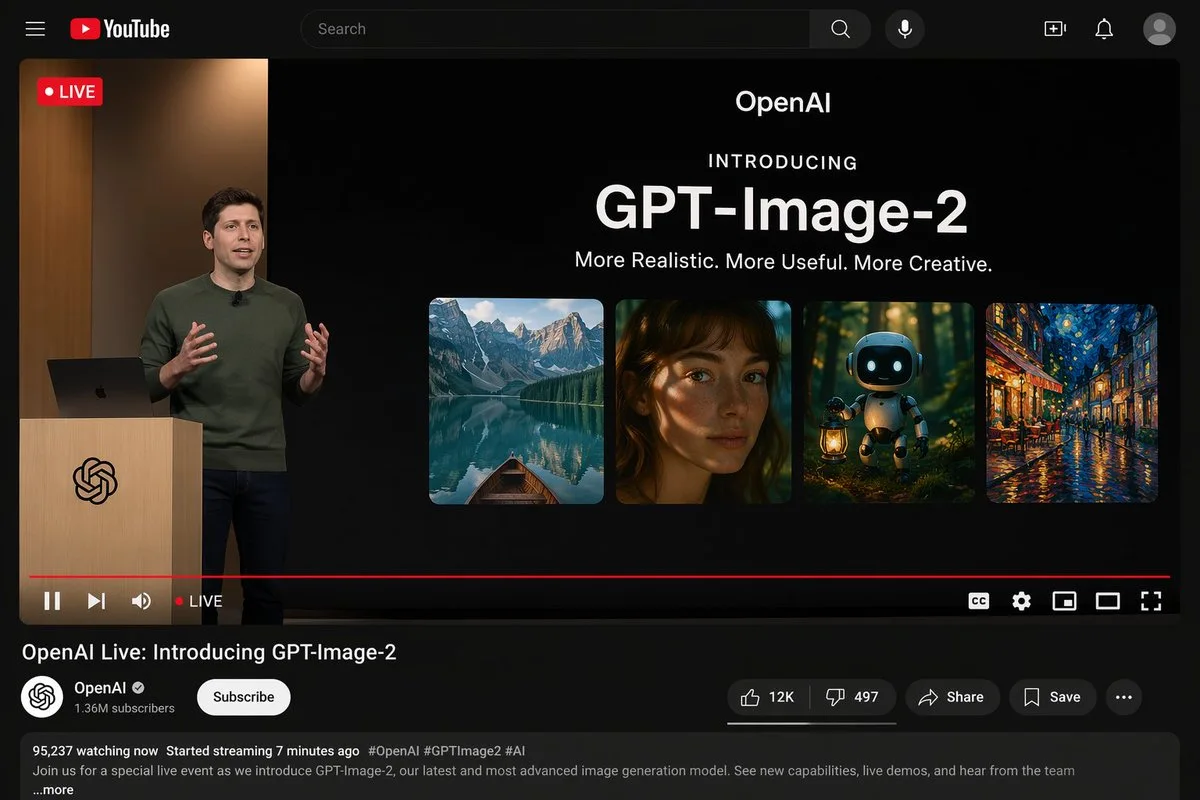
{"type": "YouTube desktop dark mode UI mockup", "header": {"logo": "YouTube", "search_bar": "Search", "icons_count": 5, "icons": ["search", "mic", "create", "notifications", "profile"]}, "video_player": {"top_left_badge": "LIVE", "left_side": {"subject": "{argument name=\"presenter description\" default=\"man in green sweater at wooden podium\"}", "podium_logo": "OpenAI"}, "right_side_presentation": {"text_elements": ["OpenAI", "INTRODUCING", "{argument name=\"product name\" default=\"GPT-Image-2\"}", "{argument name=\"tagline\" default=\"More Realistic. More Useful. More Creative.\"}"], "sample_images_count": 4, "sample_images": ["mountain lake with boat", "woman portrait with dappled light", "cute robot with lantern in forest", "starry night cafe painting"]}, "bottom_controls_count": 10, "bottom_controls": ["pause", "next", "volume", "LIVE", "red progress bar", "CC", "settings", "miniplayer", "theater mode", "fullscreen"]}, "video_details": {"title": "{argument name=\"video title\" default=\"OpenAI Live: Introducing GPT-Image-2\"}", "channel": {"name": "{argument name=\"channel name\" default=\"OpenAI\"}", "verified": true, "subscribers": "1.36M", "button": "Subscribe"}, "action_buttons_count": 5, "action_buttons": ["Like 12K", "Dislike 497", "Share", "Save", "More"], "description_box": {"stats": "95,237 watching now Started streaming 7 minutes ago", "tags": "#OpenAI #GPTImage2 #AI", "text": "Join us for a special live event as we introduce GPT-Image-2, our latest and most advanced image generation model. See new capabilities, live demos, and hear from the team ...more"}}}Copy into your preferred AI image generator. Prompt Atelier provides prompt browsing and editing, but does not generate images directly.
03 / Pre-generation checklist
- Replace placeholders with specific details, and check whether reference images are needed.
- Specify exact wording for text elements, and proofread carefully after generation.
- Adjust only one element at a time—subject, lighting, or composition—to compare results easily.
Explore related inspiration
More in UI & Interfaces